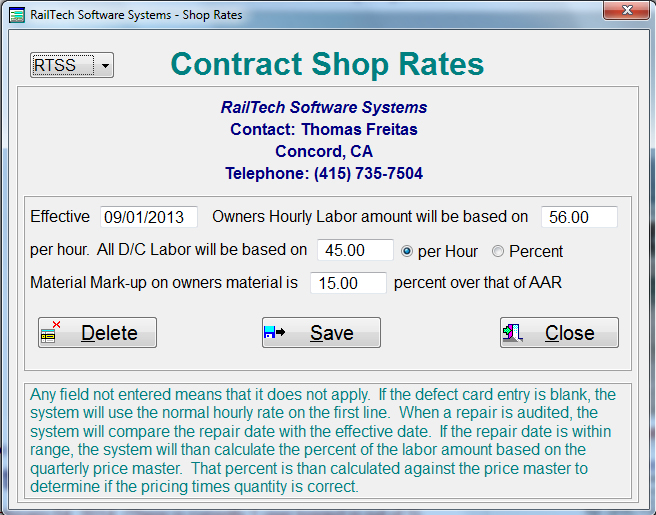
Below is the screen for assigning various shop rates for auditing purposes
Enter all the information that is allowed by your company. If you do not allow some items, such as material markup, than leave that blank. When an audit is performed the system will look for the initials of the company that is billing in the shop rates file. If it is found, the system will than look at the hourly rate that they charge as well as the other items you have listed.
As an example; If the agreed rate with the shop is $57.50 per hour and the repair date is 9/27/2013, the system will look up job code 4450 in the 2nd quarter price master and divide $57.50 by the labor charge. All labor would therefore be based on $57.50 / 114.33 or .5029 of the actual charge.
Based on the above, if the repair date was 9/27/2013 and the job code was 4470, the system will take that actual labor charge of $168.18 and multiply that by .5029 to come up with what the labor charge should be. In this case it would be 84.58. Therefore, if the labor charge for 4470 for that shop was greater than $84.58, the system will flag that as an error.
If the shop had an agreed markup of material of 15%, than based on the above, the system would calculate the material price of $14.64 multiplied by 1.15 or an allowable charge of no more than $16.84.
This screen can be accessed through the rolodex file or in the main menu under shoppings.