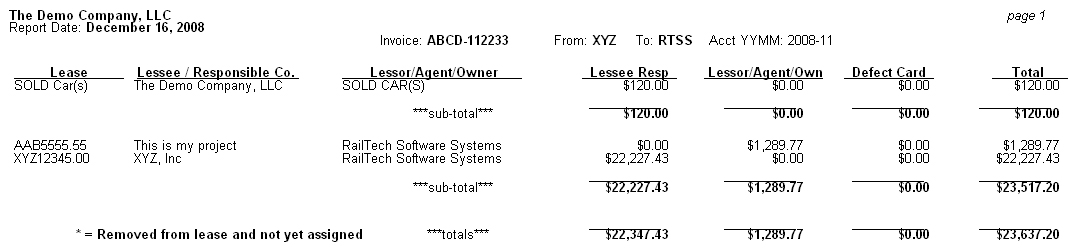
Once all the data has been entered into the Pre-Audit file and the Lease Responsibility has been set, then you should go to Reports, Invoice Cover Sheet. The invoice cover sheet is a summary of each invoice. The cover sheet summarized by Lessor, then Lease Number and shows a break down of all responsibilities for that specific invoice. In most cases, the invoice cover sheet will be one page. This page should be stapled to the front of the invoice for future reference.
When you send the invoice to accounting for payment with the cover sheet attached, the accounting department will know exactly what the payments on that invoice are for.
NOTE: The first line shows SOLD CAR(s). In this example, the car that this line of repair is for, was sold to the DEMO Company after the repair date. If a car was not in the car file, then the lease number would state UNKNOWN and the Lessee/Responsible Co. would show the car initial and the car number. If a car is assigned to a lease, but does not yet have an on rent date, then it is considered "FREE" and would always show as lessor's or Owners responsibility, unless it is a Defect Card.