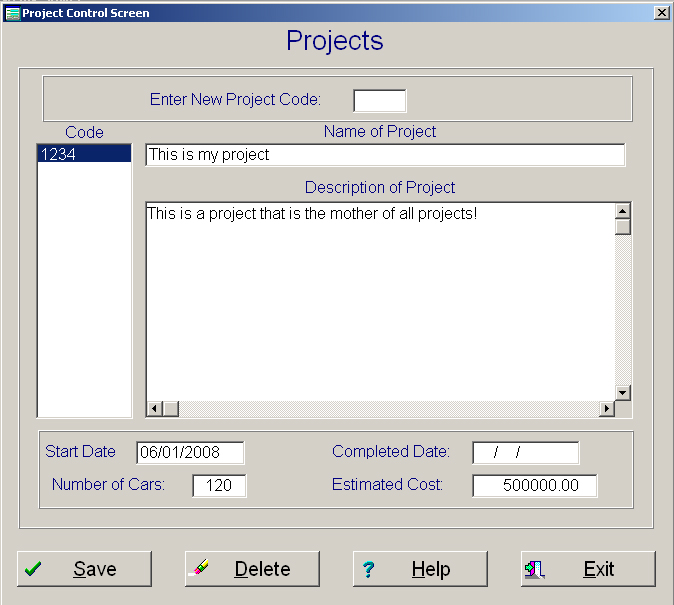
Code: The code can be from 1 to 4 characters. The characters can be alpha numeric. It is important to realize that each position of the code is unique. So a code of 0002 is not the same as a code of 2 or a code of 002. The same is true with alpha characters. A code of 123A is not the same as a code of 123a.
Name: The name is a brief description up to 40 characters as to what the project is.
Description: Is a detailed description as to what the project is. This area can be as large as 254 character.
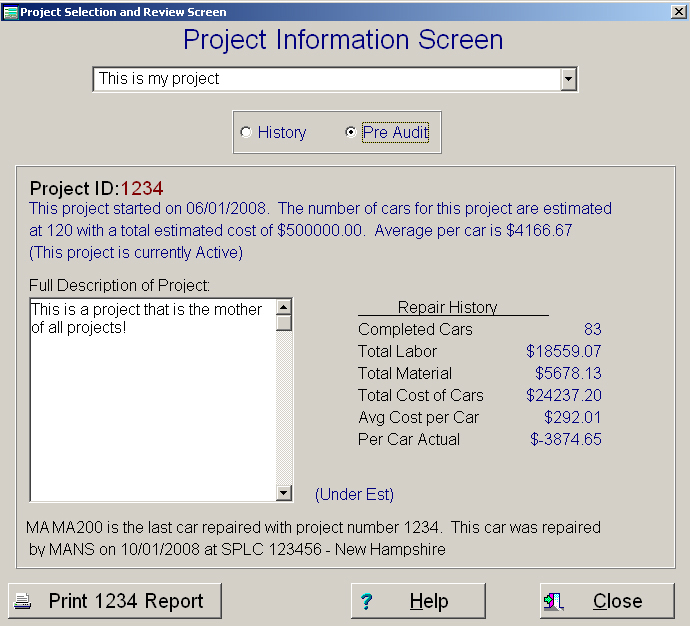
1. Displays an overall view of the projects showing where you stand at present with the project. The top of the screen will display when the project started, how many cars are in the project, the total estimated cost and if the project has ended or not.
The bottom right side of the screen will display the actual cost to date from the history file for this specific project. It will also display if the current cost of the project are in line with the estimate or if it is over or under the estimate.
The bottom of the screen will display the last car that was repaired on this project showing the repair date, the company that did the repairs and the splc and state where the repairs were performed. (If the company is designated as a shop in the rolodex file, the system will show the city and state)
2. When a project is displayed, there will be a push button at the bottom left of the screen that will allow you to print a summary of this project. The report is by Company doing the repairs, showing if the cost are in line by each repairing location. This report will display each car repaired, the date it was repaired, the actual cost of repairs, and plus or minus what the average estimated cost should be for each car. The bottom of the report will display a summary of all the cars compared to the project estimated cost.