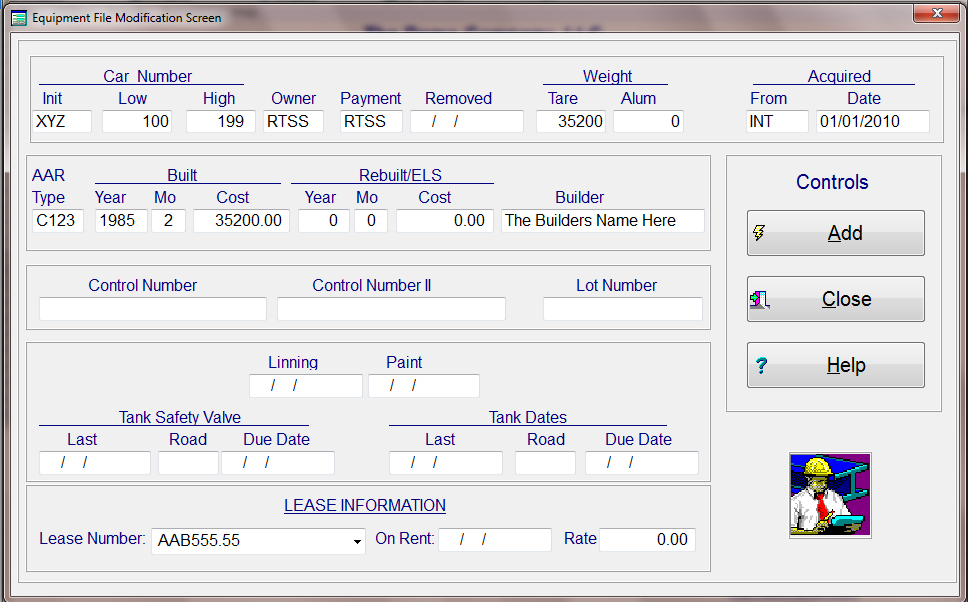
Adding Equipment: From the main menu, under "Files", select Equipment, then Modify, and then Add Equipment. This screen will allow you to enter series of cars or only one car to the equipment file. The fields that must have values in them are: Car Initial, Low and High car numbers, owner, payment, tare weight, who and when acquired,AAR Car Type, Year/Month Built, Original Cost and Lease Number.
Before you can enter equipment into the car file, there must be a lease number that it can be assigned to in the lease file. If the equipment is not assigned to a lessee, then it needs to be assigned to some sort of a holding lease number.
The owner initials may or may not be that of the Lessor/Lessee. The payment initials are the initials of the Lessor/Lessee/Owner that is responsible for paying any incoming invoices.
The lease number is a pull down selection that will list all leases that are currently active in the lease file. Once all information has been entered, the system will then validate all entries and inform you of any errors.
This screen is used only for adding equipment to the car file. Once you are finished, press the "Add" push button. When adding equipment the system will automatically assign the car initial and number as the original initial and number. This is used like a serial number so that the system can maintain historical data on each car.