Upgrading or Updating your system
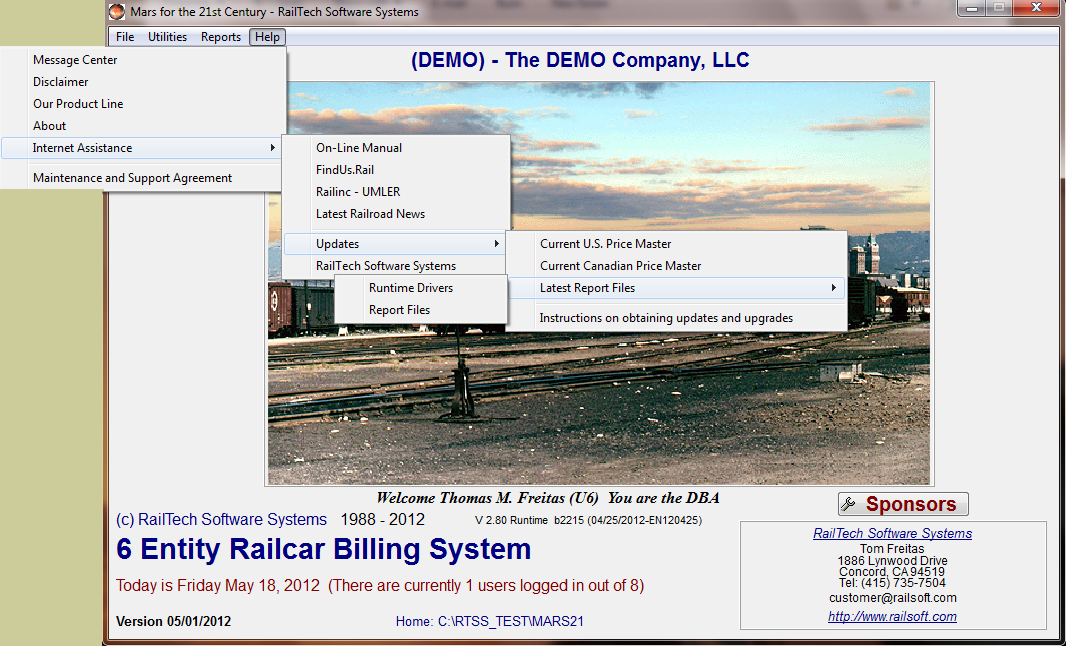
To upgrade your software, go to our website, select Updates, Mars for the 21st Century, then enter the User Name and Password. Click on the file you want and either open it or save it to disk. Once opened, extract all the files into the directory that the program is in making sure that no one is using the system first.
To update the software you can either go to our website as indicated above
or from the program, select Help, then Updates, then what it is you want to
update.
a) Get the Current U.S. Price Master
b) Get the Current Canadian Price Master
c) Get the Latest Report Writer Drivers
d) Get PDF Drivers, (Needed if you want to create PDF reports)
e) Get the Most Current Update/Upgrade for this program
The Latest Report Writer Drivers as well as the PDF Drivers, do not require User Names or Password. The system will automatically go to our website and grab the appropriate file to be unzipped into the program.
If you select the "Current U.S. Price Master" or the "Current Canadian Price Master", then the system will automatically go to our website, ask you for your User Name and Password, then grab the appropriate files for extracting in the directory where the program is in.