Data Transfer for Rover Software
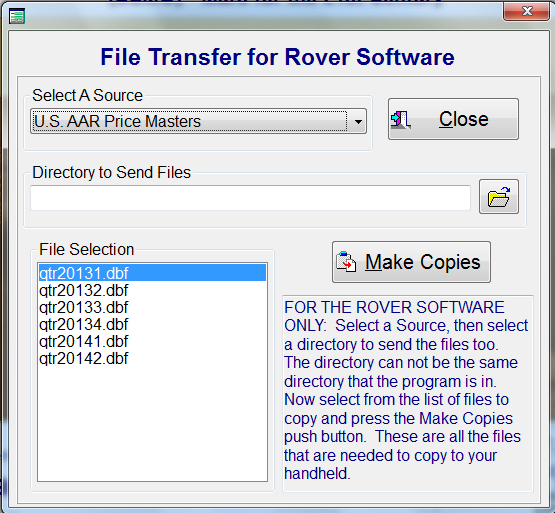
The Rover Software for handhelds has the ability to use files that are in the Mars for the 21st Century software. These files can be quarterly price masters; U.S., Canadian or Customer Specific, Job Codes such as ; AAR, Customer Specific, NitLeague or Default User. There are also default files that can be copied over. After the Select A Source is selected, the files pertaining to that selection appear in the File Selection area. The directory to send the files is created by pressing the Folder push button to the right of the selection. Once the information is selected and the file selection has been highlighted, then press the Make Copies and the system will validate the drive, determine that you have a minimum of 10mb then copy the selected file over. If is best to copy the files to a blank directory on your hard drive, then zip the files and copy the zipped file to your flash drive. Then put the flash drive in your handheld and let your unzipping program unzip the files into the Rover directory on your handheld.