There are three main files, other than History, were you can move cars from one to another. Those files are BRC, Quote, Suspense. The BRC file, is where all invoices are created from, see invoicing. The Quote file is a holding file for quotes sent to a customer and the Suspense file holds cars that may not be billed, but still need to be saved for one reason or another.
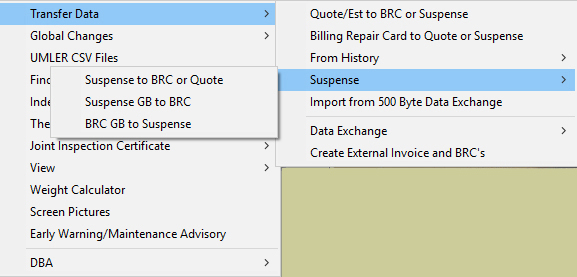
When you need to move one or more cars from one file to another, do the following; From the main menu, select Utilties, Transfer Data, than what you want to transfer the data from. See picture below.
Once you have selected either the Quote/Est to BRC or Suspense .or the Billing Repair Card to Quote or Suspense, the below screen will appear.
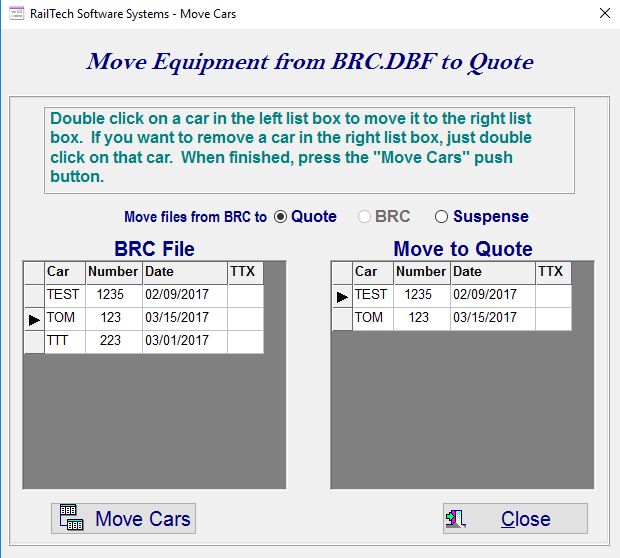
This screen will allow you to move one or more cars to one of two files. The file that you are moving cars from will always dispaly as an inactive selection for obvious reasons. You can now select one or more cars to move to a file you select. If you need to move cars to the other file, than select the file at the top and move the cars to the list that you want moved.
Once you have all the cars in the list that you want moved to the selected file above, press the "Move Cars" push button and they will be moved as you have indicated.