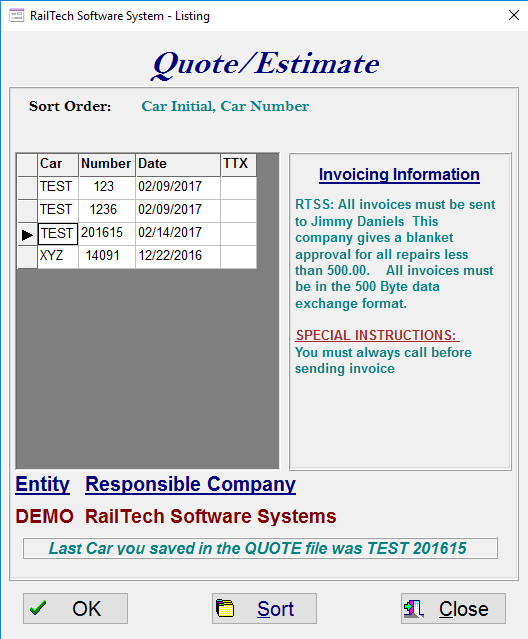
Whenever a function is performed that requires you to select a car from a file, the below screen will appear.
The screen will show you all cars within a file that you select. These cars will all default to car initial, car number order. The last car that was saved, either by create or by edit, will be highlighted on the screen. A message will also appear under the Entity and Customers name stating that this is the last car saved.
If you would like to change the order, press the Sort push button and the below screen will appear
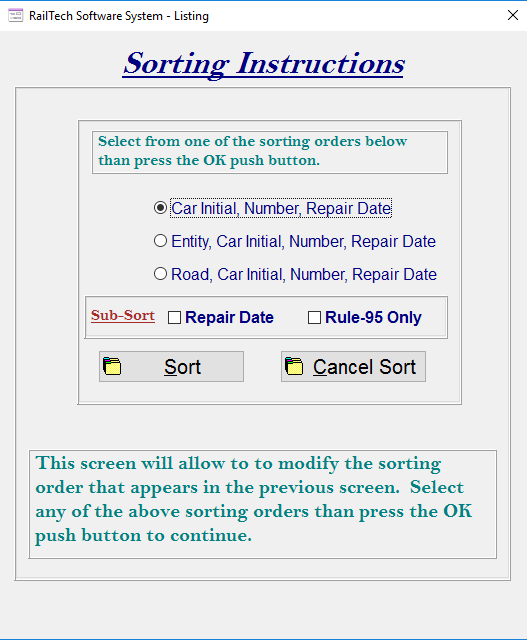
Select the main sort you want at the top. If you would like a sub-sort, you can select either or both Repair Date or Rule-95 Only. When you click the Sort push button at the bottom of this screen, you will be returned to the car listing screen. If the car you last saved is in the sort you selected, than it will be highlighed.
NOTE: Not all listing of cars allows you to select Sort! Example: If you select Joint Inspection Certificate under Utilities, than you will only see Rule-95 repairs and therefore, you would not be able to select a sort.