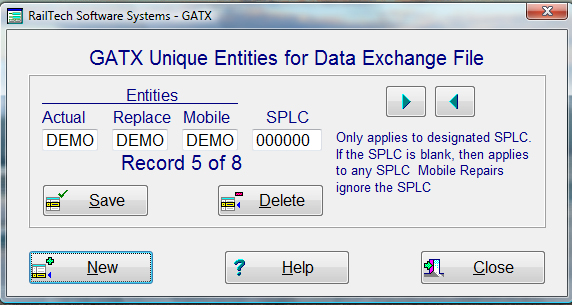
GATX has specific criteria pertaining to their extended 500 Byte Data Exchange formats. One of the criteria is that each location must have their unique marking or entity initials. Also, that any mobile repairs must have a unique mark or entity. For this specific purpose only, this screen will allow you to change your company mark when creating a data exchange file using the GATX or GATX MOBILE formats.
IMPORTANT: You must inform GATX of your initials or entity mark that you use. If you do mobile repairs, then the mobile repairs must have a seperate initial or entity mark as required by GATX.
If you perform all your repairs to GATX cars at one shop location or you only perform mobile repairs for GATX, then you do not need to change anything using this screen.
When you first select GATX Initials under Utilities, Transfer Data, Data Exchange, the screen will automatically populate with your assigned entitites if there are no records in the file. The system will only allow your assigned entities to be entered and saved.
If you have more then one shop and all these shops use the same entity or initial to designate your company, and you repair GATX cars, then you must use this screen. Each location must have a unique initial that designates that location for GATX. You can do this by simply enter your entity initial, the initial you want to replace it with in the data exchange file and the SPLC where that location is. When a data exchange file is created using the GATX format and it is not a mobile repair, the system will look up the SPLC. If it finds it, then it will replace the entity initial to what you enter in the REPLACE field above. If it does not find the SPLC, then it will keep the entity initial that is already there.
If you have one or more contract shops that repair cars at the shop location as well as mobile repairs for GATX, then you must have a seperate entity or initial for mobile repairs. By changing the MOBILE entry field to the initial to use, the system will automatically change the entity to that initial when creating a data exchange file with GATX format and Mobile Repair selected. The system does not look for the SPLC, only the mobile initial to use for the entity in the repairs.
These functions only works if you create a data exchange file and select GATX Format or GATX Format with Mobile Repair checked.
Main Modifications for GATX Data Exchange Files
Contract Shop Repairs:
Billed Party must always equal GATX
Estimate can not have invoice number, but is required on final billing
Estimates can not have a repair date, but required on final billing
Repairing Party must be blank on estimates, but required on final billing
If you have GATX repairs at more then one location, then each location must have a seperate company mark or entity.
If a line is deleted after estimate/bill was submitted to GATX, then the line number that was on that line can not appear again
If a repair is inserted or added after an estimate has been submitted to GATX, then that line number must be the next highest number.
Estimates must be sent to the GATX FTP site.
Mobile Repairs:
Billed Party must always equal GATX
Estimate can not have an invoice number, but is required on final billing
Must have a repair date
Can not have an arrival date
Repairing Party must be blank on estimates, but required on final billing
The company mark or entity can not be the same as the shop mark or entity if you do repairs in a contract shop.
If a line is deleted after estimate/bill was submitted to GATX, then the line number that was on that line can not appear again
If a repair is inserted or added after an estimate has been submitted to GATX, then that line number must be the next highest number.
Estimates must be sent by email to the GATX ME-Maintenance Expert.
There are other criteria, these are simply the main points. If you need to know what all the criteria is for GATX extended 500 Byte data exchange files, please contact GATX.