When creating a report for the first time that you want to e-mail directly from the report screen, it is always best to send it to yourself first.
The Output should be set to Display/Print. Please keep in mind that if you are sending an estimate, it can only be one car at a time when exporting only. When you run the report, a screen will appear asking where you want your report to go; Screen, Printer, Export. Select Export and press the OK push button.

The Send via MAPI checkbox on the Export Mail Options tab enables you to export reports as mail attachments.
This option is available only if you have MS Mail or another email application that supports MAPI (Messaging Applications Programing Interface). This box will be dimmed if you do not have MAPI available on your machine.
When you check the box, Send Via MAPI, the exporting of email options will appear as shown above. Now check the box "Address and Auto-Send Single File" and enter the email address to whom you want to send this report too. On the right side of this screen you can enter the subject matter for the e-mail as well as a message pertaining to the e-mail. Press the Export push button to send the report. If all is correct another screen will appear as shown below;
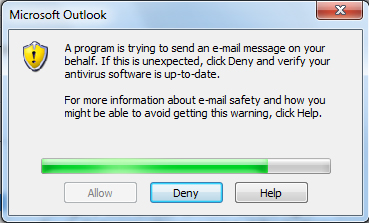
When it is finished downloading the report, press the "ALLOW" push button. The system will than automatically attach it to the email and send it according to you instructions.
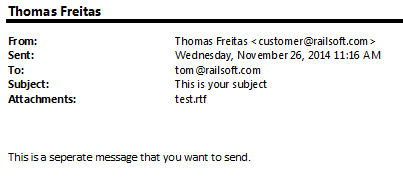
The e-mail received will appear like any other e-mail with an attachment, being the report you created. Example of a received e-mail is below;