Backup of Databases
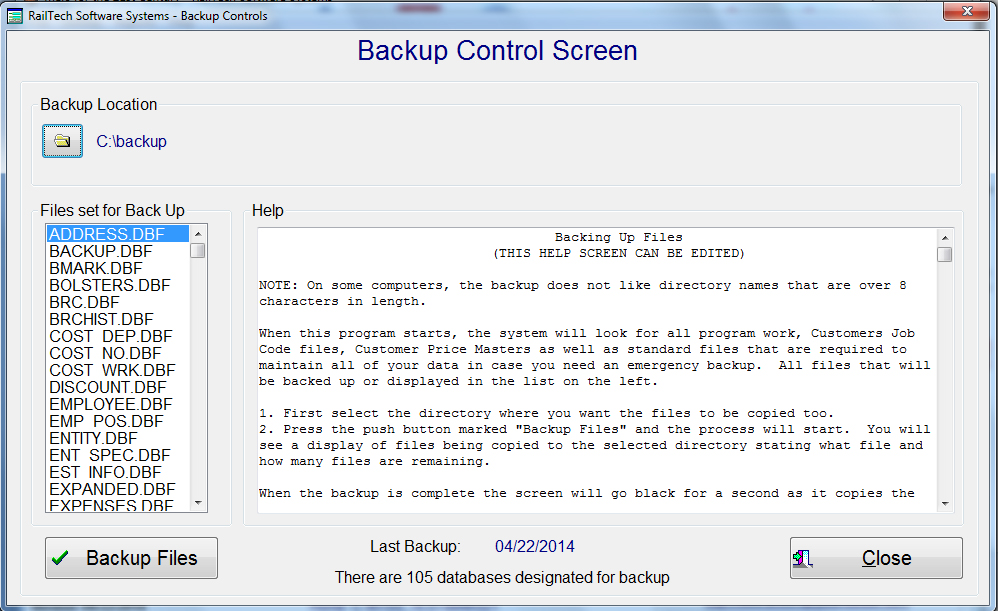
This function is designed to back up all the databases of importance on your system. When you first start this program, the system opens the backup databases which has a listing of all the databases that must be backed up. It will then find all the program work, customer job code files and customer price masters that have been created and put them at the bottom of the backup database.
All the files that will be backed up will be displayed on the left of the screen. The bottom of the screen will display when the last backup was performed and how many databases are set for backup. The first thing you need to do is designate where you want the data copied to. The directory that all copies will be sent to, will display next to the push button where you selected the directory. You obviously can not back up databases in the directory where the program databases exist.
When you press the "Backup Files" push button, copies of all files in the list will be made in the directory that you designated. As the system is copying the data it will display the database that is being copied along with what number it is in the backup databases and how many there are in total. When program work or custom job code files or customer price masters are being copies, it will state that on the right side of the message showing the name of the database being copies.
All copied databases should then be stored off site for safe keeping. REMEMBER: Your data is only as good as the last time you created a backup! If something happens to the computer that the program is on and you can no longer access programs, we can give you a new install program and all you need to do is copy the backup files into the new installed program. Once you have copied the backups into the program and perform a re index of all files, you are ready to go!