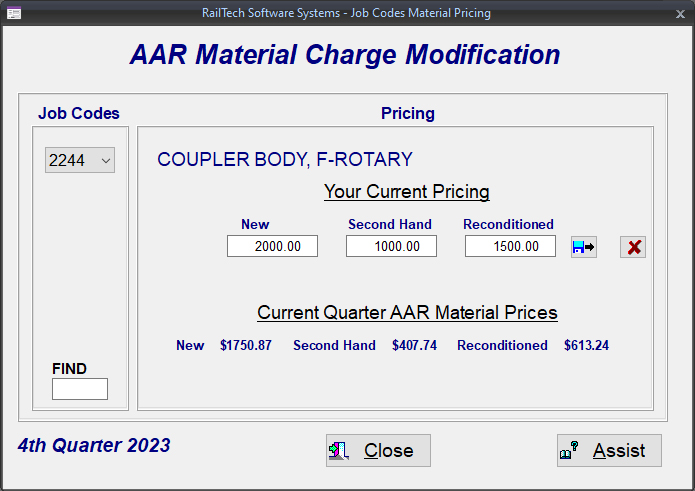
Modification of AAR Material Pricing for responsibility code of 1, owners!
The system uses the current price master for obtaining your pricing controls. The left side pull-down on top is the job code that is being used. Since there are a lot of job code, you can just enter the job code you want to find at the bottom left, then press your enter key.
Once the system has found the job code that you want, it will display the pricing of New, Second Hand, and Reconditioned on the right side of the screen. If you have data that indicates your pricing for that job code, it will display in the entry fields on the top right side. If an entry field is inactive, meaning that you can not go into it, that is because the AAR Price Master shows this item for that condition is not available and therefore, can not be priced.
The way that this screen works is when you select a job code, the system will look for that job code in the current price master where the removed job code is the same as the applied job code and the why made is 1 or worn out. It then looks at the condition codes 1, 2 and 3 to determine what the New, Second Hand and Reconditioned charge is for the material, if any. Once found, it will display all the available charges as well as any modified charges that you may have already entered!
If the entry field at the top is enabled, meaning you can enter something in it, then you can change the pricing! to whatever you want, as long as it is greater then $0.00. Once you have finished with the entry, push the button on the right to SAVE the data. The system will look for the job code along with the condition code in the database stored on your system. If it is found, then the system will replace what is in there. If it is not found, the system will create a new record for that job code and condition code.
If you decide that you want to delete your entry for a specific job code, then press the button on the right with the X on it. The system will ask you to verify that you want to delete the record. If you state YES, then all the data in your pricing modified file for that job code will be removed.
In your Billing Repair Card or Quote screen is a check box that states "Mod AAR Matl". If this box is checked, then the system will look in your modified AAR Material Pricing table, and if found, will change the material price to what is in the table. The check box can be checked or unchecked on any line of repair.
REMEMBER: If you check or uncheck the box, you must click the button to clear out pricing then go into the responbility field and press enter. No pricing will be calculated unless you do this!