
1886 Lynwood Drive/Concord, CA 94519
Telephone: (415) 735-7504
Entering Values in a List

If you have selected "in the list" or "not in the list" as the comparison
operator, you can enter multiple comparison values.

The compared to section for list operators has two boxes.
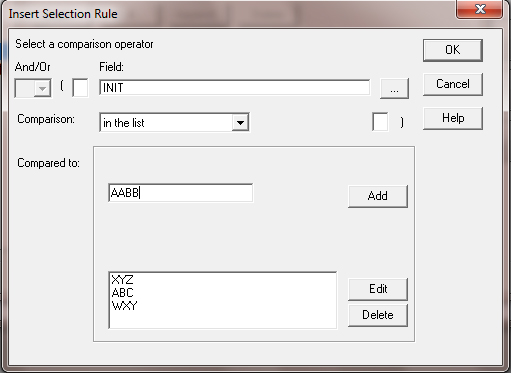
Figure 12.3

The upper box is where you edit/add a list item. You use the same format for
entering as you would enter a single value comparison of that same data
type.  After you make an entry, press the Add button to add the current item to
the list.

The list of added items displays in the list box below.  You can edit or delete
an existing list item by selecting it in the list.  Pressing the Delete button
immediately removes the item from the list.  Pressing Edit moves the selected
item to the upper box where you can make your changes and press Add to
place the edited item in the ist below.

A comparison list can contain up to 25 item.