
1886 Lynwood Drive/Concord, CA 94519
Telephone: (415) 735-7504
Comparison Formats by Operator Type

Single Value Comparisons

The operators Equal to, Not Equal to, Greater than, Greater than or equal to,
Less than, Less than or equal to are all single value operators.  This means
that they compare the selected field to a single value.

This single value can be either a literal value which you explicitly enter in
the selection rule or it can be an existing report field.

The compared to box for a single value comparison operator contains two
boxes.
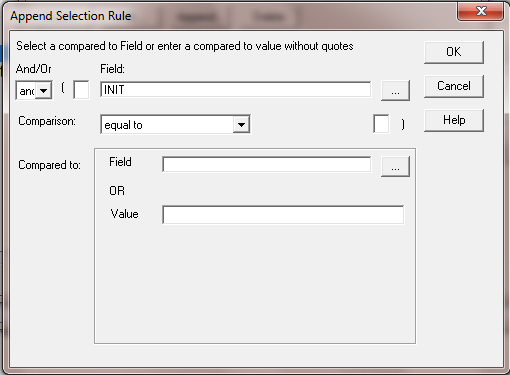
The upper box is a field list box where you can select an existing field.

The lower box is the value entry box where you can enter a literal value.

Note that you can either select a field OR enter a value.  If you first select a
field and then enter a value, when you enter the value, the field entry is
cleared.  It also works the other way around.  If you enter a value and then
select a field, the value entry is cleared.

See the next sections for information on entering values for each available
datatype.