
1886 Lynwood Drive/Concord, CA 94519
Telephone: (415) 735-7504
Comparison Formats by Data Type

Entering String Values

When you enter a string value as either a compared to value for an equality,
a FROM or TO value for a range or a list item for a list, you do not need to
add any explicit string delimiters.  The program will assume that what you
enter is an actual string.

So if you create a rule to select records where the car initial is equal to
"XYZ", the program will look for records where the car initial field contains
the literal "XYZ" rather than the literal XYZ.

The following rule:

Field                   init

Comparison              equal to

Compared to Value       XYZ

will be displayed in the Query dialong as:
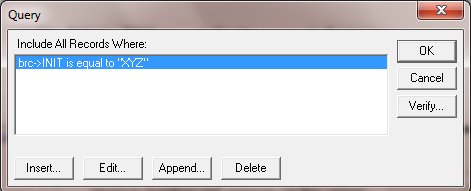
Note that the literal XYZ is displayed in quoted delimiters.

To select a blank value as a comparison value, you can simply leave the
compared to value blank and press OK.


Entering Numeric Values

When you enter a numeric value as either a compared to value for an
equality, a FROM or TO value for a range or a list item for a list, you enter
only signs, decimals and digits.